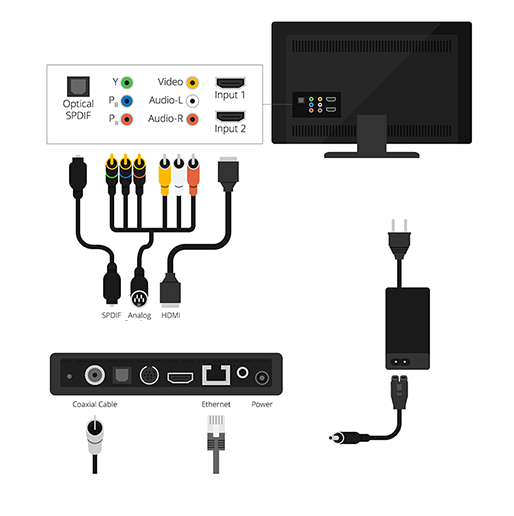
To access IPTV on an older TV, you'll need to connect it to an external device known as an IPTV media box or set-top box (STB). This device links your TV to the internet and functions as an IPTV receiver. There are several popular IPTV media boxes available on the market, including Android boxes, MAG boxes, Enigma boxes, Apple TV, Roku, and others.

Can You Use IPTV on an Old TV? Absolutely.
As TVs continue to evolve into smarter devices, owners of older models might feel left out from enjoying modern features and apps. Fortunately, there are many streaming media players available that can transform a regular TV into a smart one. Devices like Apple TV, Roku Premier, Amazon Fire TV, Nvidia Shield TV, and Google Chromecast can bring streaming capabilities to almost any television.
Set-Top Boxes: The Ultimate Solution for Older TVs
The most reliable way to turn an old TV into a smart device is by using a set-top box (STB). These boxes don’t just give you access to IPTV channels—they open up a range of features and options, from streaming services to gaming and media playback.
Android-Based Set-Top Boxes
Android boxes provide access to the Google Play Store, allowing you to download and enjoy thousands of apps and games on your TV.
One of the best all-in-one solutions is the Nvidia Shield, which supports high-quality IPTV streaming and also includes a game controller, making it perfect for Android gaming on the big screen.
iOS-Based Set-Top Boxes
Apple’s Apple TV is the leading option for iOS-based streaming. It enables users to stream video, music, and podcasts in high definition, as well as download apps and games from the App Store.
The device includes a sleek remote with Siri voice control, a touchpad, and even motion sensors like an accelerometer and gyroscope for interactive gameplay—making it one of the most advanced streaming devices available.
MAG Boxes
Infomir’s MAG series is among the most popular IPTV devices globally. Since 2007, Infomir has been producing high-quality set-top boxes under the MAG brand. These versatile boxes are designed to organize your media content and provide smooth IPTV access.
Newer MAG models also come with Android OS, but it’s important to verify whether your IPTV provider supports these updated versions.
How to Connect a Set-Top Box to Your Old TV
Connecting a set-top box is simple and straightforward:
Place the TV box in the same room as your television.
Plug the set-top box into a power outlet.
Connect it to your TV using an HDMI cable (use an available HDMI port).
Turn on your TV and switch the input source to the correct HDMI port.
Connect the set-top box to the internet via Wi-Fi or Ethernet cable.
Power on the device and let it boot up.
Once it’s ready, follow the setup instructions to start watching IPTV channels—even on your old TV!