
In this tutorial, we'll guide you through the process of adding IPTV channels to your Enigma2 device using the XtreamTV plugin. Please note that a computer is required to complete this setup.
🔧 What You’ll Need:
XtreamTV Plugin (version 2.3 recommended)
DCC_E2 (Dreambox Control Center for Enigma2)
✅ Step 1: Download and Prepare the Tools
Download the XtreamTV Plugin (or the latest version 2.3) and DCC_E2 to your computer.
Extract both files to a folder on your desktop.
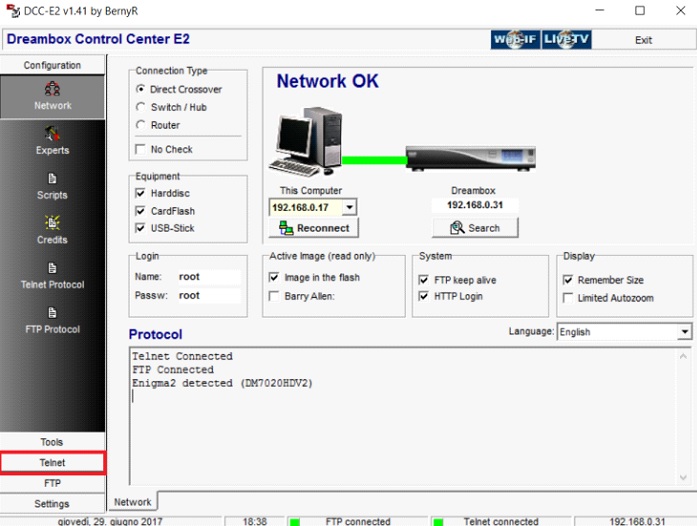
Launch DCC_E2.
Enter your Enigma2 device’s IP address.
For login credentials, use "root" as both the username and password.
Click "Reconnect" to establish a connection with your Enigma2 box.
🔎 Tip: You can find your device’s IP address by navigating to:
Menu > Information > Network on your Enigma2 device.
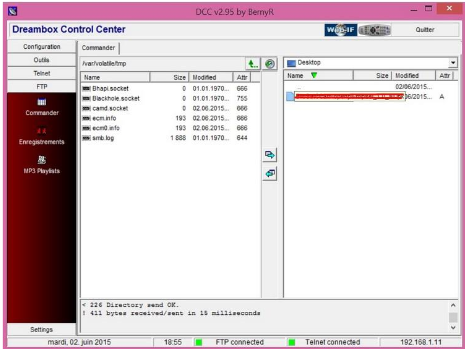
Step 2: After connecting to your box successfully go to the “FTP” section and proceed to this path “/var/temp/”. In the right side navigate to where you have saved the XtreamTV Plugins and move it in the temp folder.
Information about which XtreamTV Plugin version you need to install in your box:
Mips32el is applied to the most boxes. For example VU zero, Vu+ Duo, Zgemma and often above openpli 4 boxes or new images.
Mipsel is applied to old boxes such as DM800 clones with old openpli 2.1.
Sh4 is applied to boxes similar to spark.
Armv7a is applied to new boxes like Vu+ 4k and gigablue sf4008.
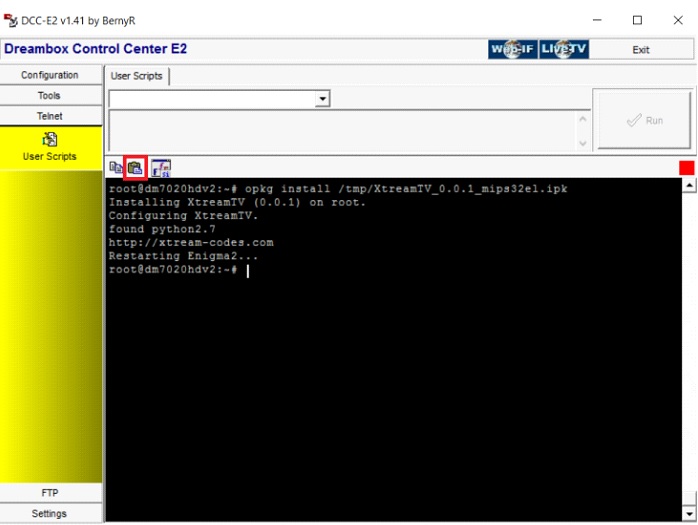
Step 3: Now proceed to “Telnet” section and paste the following scripts and press “Enter“.
opkg install /tmp/XtreamTV_0.0.1_armv7a.ipk
opkg install /tmp/XtreamTV_0.0.1_mips32el.ipk
opkg install /tmp/XtreamTV_0.0.1_mipsel.ipk
opkg install /tmp/XtreamTV_0.0.1_sh4.ipk
✅ Step 4: Activate Your XtreamTV Plugin
Once the plugin is installed, the final step is to provide your XtreamTV Plugin ID (MAC address) to your IPTV provider, or manually add it to your IPTV service dashboard.
📌 Note:
You can locate your XtreamTV Plugin ID by launching the plugin on your Enigma2 device and navigating to "Device Details". This ID is required for IPTV activation.
🔍 Enigma2: A Quick Overview
Enigma2 is essentially the operating system running on your set-top box. It's highly customizable and designed for use with Linux-based receivers like VU+ and Dreambox.
🖥️ Image Files (Firmware)
These are complete system builds stored on your Enigma2 device. Different image versions—such as OpenATV, OpenPLi, or OpenVIX—offer unique features, user interfaces, and stability. You can choose the one that best suits your needs.
🎨 Skins
Skins define the appearance and layout of menus, channel lists, and interface elements. You can personalize your Enigma2 device by downloading and applying different skins to match your preferences.
📚 Bouquets
Bouquets are pre-organized channel groups (e.g., Movies, News, Sports) that make it easier to navigate and find channels. These lists are often updated automatically, providing a seamless user experience.
📺 Picons
Picons are small channel logos displayed next to channel names in your list. Integrated with Bouquets, they enhance visual navigation and make identifying channels quicker and easier.
🔌 Plugins
Plugins are optional add-ons that extend the functionality of your device — such as adding IPTV support, weather apps, or system tools.
🔽 Where to Find Plugins?
Plugins like XtreamTV can be downloaded from trusted sources online.
Many Enigma2 boxes come pre-loaded with essential plugins for IPTV and general use, especially when purchased from IPTV service providers.