
The MAC address (short for Media Access Control address) is a unique identifier assigned to network-enabled devices, which helps distinguish the manufacturer's registered number. It plays an essential role when connecting the device to a network.
Every MAG box comes with its own unique MAC address, which must be registered with your IPTV provider’s server in order to activate the service.
Some IPTV providers offer a user dashboard where you can manage your subscription—this includes the ability to add or update your MAC address. If no dashboard is available, you’ll need to contact your IPTV provider directly to register or update the MAC address.
If you decide to switch to a different MAG device, you must update your IPTV provider with the new MAC address, replacing the old one on their system to maintain access to your subscription.
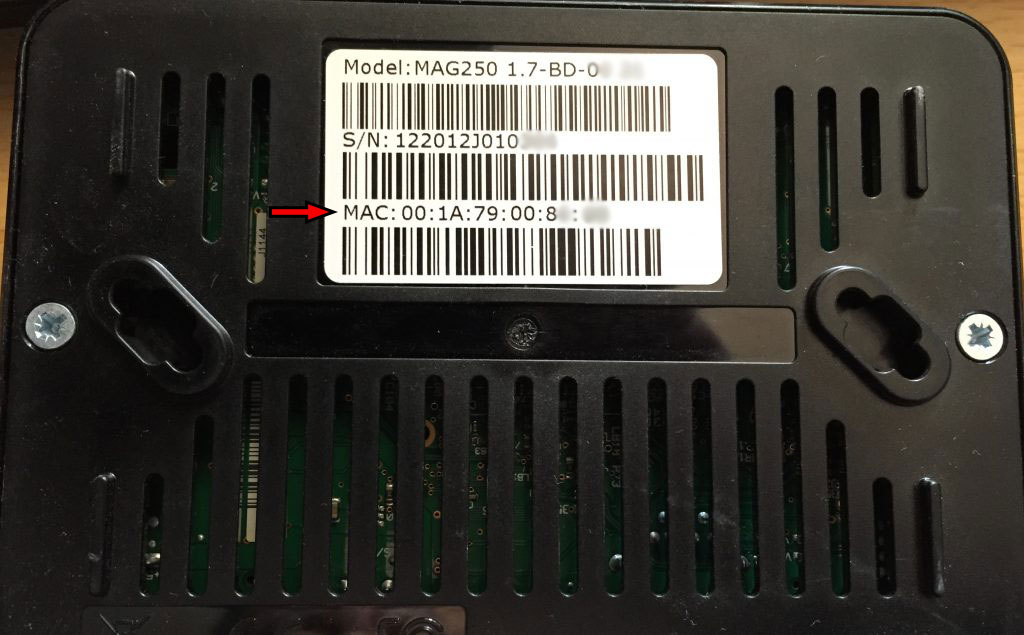
How to Locate the MAC Address
To find the MAC address of your MAG box, simply turn the device over. You’ll see the MAC address printed on the back of the unit. It typically begins with 00:1A:79, followed by a unique combination of numbers and letters specific to your device.