
AmbKonnect
Home
TV Channels
Guides
Resellers
Store
  1. Home
  2. /
  3. Help Centre
  4. /
  5. Boxes
  6. /
  7. How to Setup IPTV on Enigma 2 via Autoscript?
← Back to Help Centre
Boxes · Other boxesUpdated 3 Jul 2026

How to Setup IPTV on Enigma 2 via Autoscript?

Enigma2 is an open-source operating system used in Linux-based satellite and IPTV receivers such as VU+ and Dreambox. It offers a wide range of advanced features, including:

  • Auto-Bouquets (automated channel organization)

  • 7-Day EPG (Electronic Program Guide)

  • Picons (Channel icons for better navigation)


⚙️ Enigma2 Autoscript Overview

Older VU+ set-top boxes are based on MIPS processors, while newer models use ARM architecture. All of these devices run on Enigma2-based firmware, which is officially upgradeable by users—thanks to its Linux foundation.

Unlike many other receivers that require unofficial patches, Enigma2 firmware is supported for updates directly by the community and developers. The system was originally developed by Dream Multimedia for the Dreambox series and has since become widely adopted by other Linux-based devices.


📡 How to Add IPTV Channels to Enigma2 Using Autoscript

✅ Step 1: Download the Required Tools

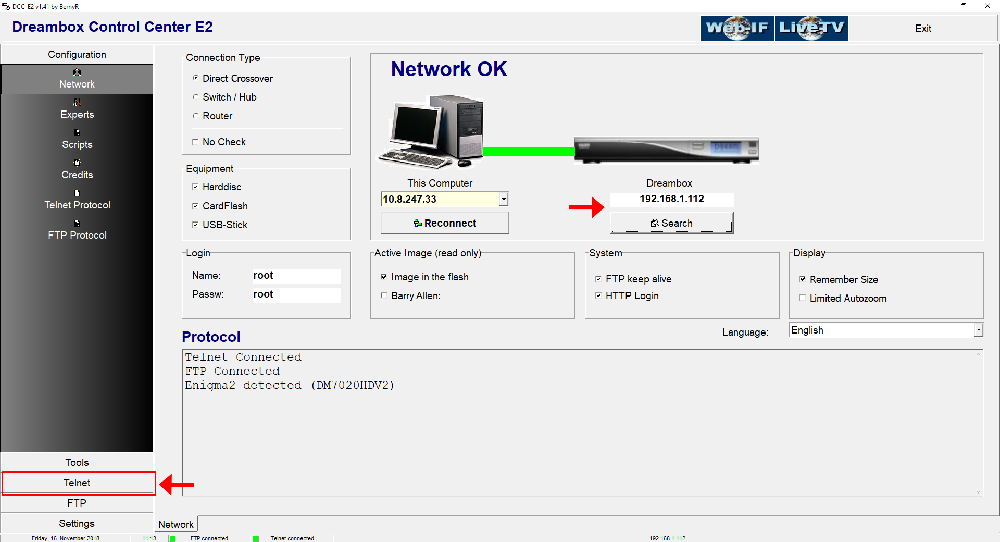
To begin, you'll need to download DCC_E2 (Dreambox Control Center for Enigma2), which is the software used to manage and configure your Enigma2 box from your computer.

You will use Telnet through DCC_E2 to communicate with your box. But first, you must locate the IP address of your Enigma2 device. Don’t worry — we’ll explain how to find it in the next section.
How to Setup IPTV on Enigma 2 via Autoscript? — illustration 1

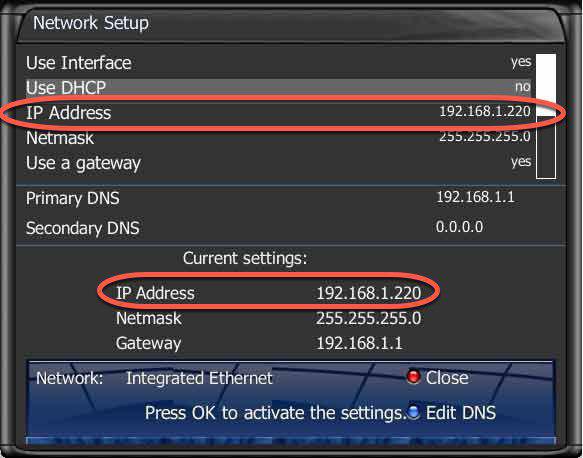
Step 2: To connect, we need to know the box IP address, username, and password (username and password usually is root/root). Now about the IP, click Menu button on the remote controller. Go to Setting then Network Settings. You should see something like the below image:
How to Setup IPTV on Enigma 2 via Autoscript? — illustration 2

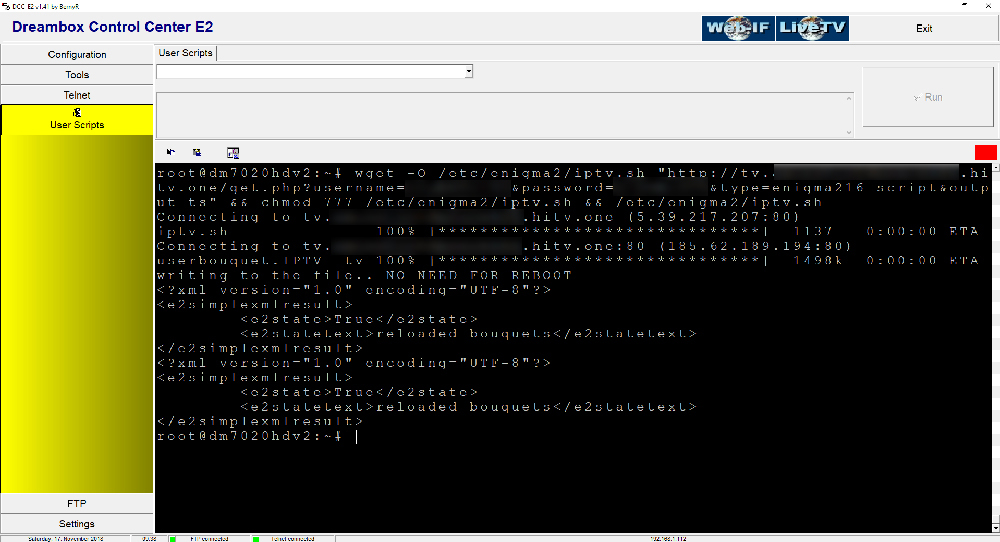
Step 3: Once connected to your box via Dreambox Control Center, it`s time to execute the Autoscript command which should be provided by your IPTV provider. These scripts can be given in two versions:

  • – OE1.6 version which uses Python 2.6: It is advised to use this version on non-Dreambox receivers.

  • – OE2.0 version which uses Python 2.7: It is advised to use this version on Dreambox receivers.

So for our Dreambox of this example the command line should be like this:

wget -O /etc/enigma2/iptv.sh "http://tv.yourdns.com/get.php?username=your-line-username&password=your-line-password&type=enigma216_script&output=ts" && chmod 777 /etc/enigma2/iptv.sh && /etc/enigma2/iptv.sh

Copy/paste this command line on Telnet Terminal and hit enter.
How to Setup IPTV on Enigma 2 via Autoscript? — illustration 3

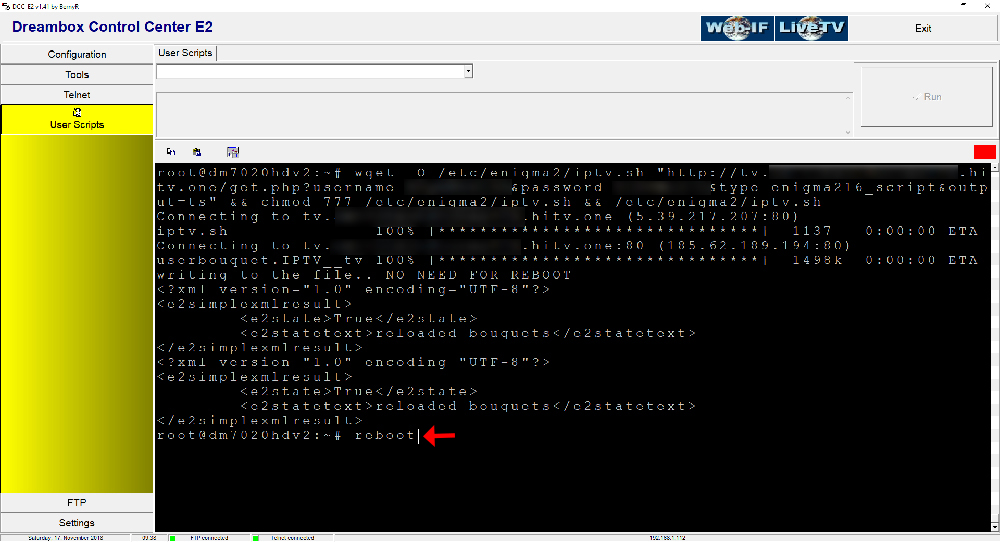
Step 4: We suggest everyone to reboot the device once you execute the Autoscript command. To reboot the device just write “reboot” on Telnet terminal.
How to Setup IPTV on Enigma 2 via Autoscript? — illustration 4

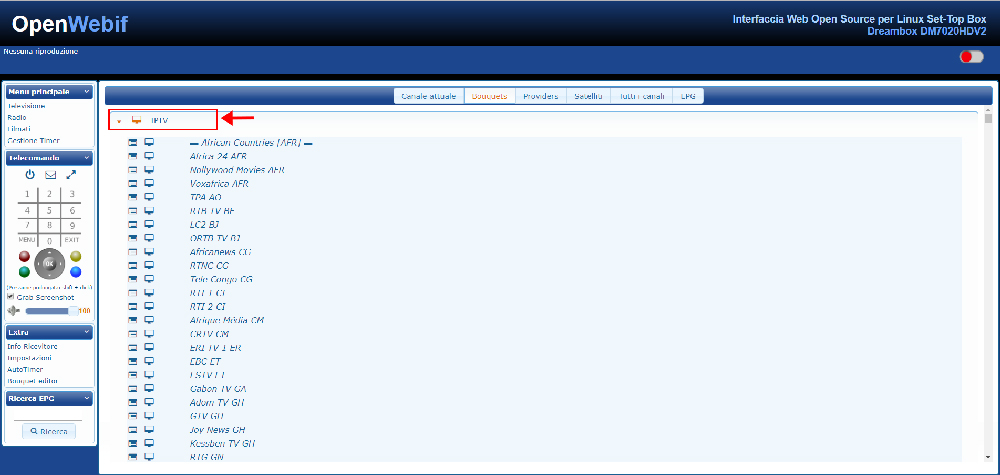
Step 5: After the Reboot, you will see on Bouquet list a new Group called “IPTV”.
How to Setup IPTV on Enigma 2 via Autoscript? — illustration 5

More in Other boxes

View all →
  • How to Setup IPTV on Enigma 2 via XtreamTV plugin?
  • What is Enigma Firmware Image?

Related guides

Boxes · Other boxes

How to Setup IPTV on Enigma 2 via XtreamTV plugin?

In this tutorial, we'll guide you through the process of adding IPTV channels to your Enigma2 device using the XtreamTV plugin . Please note that a computer is required to complete this setup. 🔧 What You’ll Need: XtreamT

Read guide →
Boxes · Other boxes

What is Enigma Firmware Image?

Enigma2 is an open-source software platform compatible with Linux-based operating systems. It features a user-friendly Graphical User Interface (GUI) and offers a range of advanced functions, such as Auto-Bouquets , 7-da

Read guide →
Boxes · Formuler Box

How to setup IPTV on Formuler box via MYTV Online app?

In this guide, we’ll walk you through the steps to set up IPTV channels on MYTV Online using a Formuler Z device. Formuler Z is a modern hybrid device that combines an IPTV receiver with an Android media player . Since i

Read guide →
Boxes · Formuler Box

How to setup IPTV on FormulerZ8 box via MYTV Online 2 app?

FormulerZ boxes are among the top choices for IPTV streaming, thanks to their advanced features and flexibility. One of their key advantages is the ability to support both MAC-based portal systems and M3U-based playlists

Read guide →

Explore AmbKonnect

  • Quick setup guidesGet streaming in under 10 minutes
  • All help articles42 guides for every device
  • TV channel list15,000+ live channels worldwide
  • Pricing plansCompare subscription options
  • Subscribe nowInstant activation, money-back guarantee
  • Contact supportOpen a ticket — we reply 24/7
All articlesQuick setup guidesContact supportSubscribe now
AmbKonnect

Seamless Streaming, Unmatched Quality. Your Ultimate IPTV Experience. Since 2010.

Navigation

  • Home
  • TV Channels
  • Subscribe
  • Members Area

Help Center

  • Blog
  • Help Centre
  • Setup Guides
  • Contact Us

Legal

  • Terms
  • Privacy
  • Abuse report
© 2026 AmbKonnect. All rights reserved.