
🔧 Troubleshooting M3U URL Issues in IPTV Services
In this section, we’ll share some helpful tips for diagnosing and fixing problems related to M3U URLs when using IPTV services.
💡 What Is an M3U URL?
An M3U URL is a link provided by your IPTV provider that contains your playlist of live channels, movies, series, and more. It typically includes your server address, username, and password.
🛠️ M3U URL Troubleshooting Steps
Verify the M3U URL
The first thing to check is whether the M3U URL is entered correctly. Make sure the server address, username, and password are accurate and free of typos.Use Your Provider’s Dashboard
Most IPTV providers offer a customer dashboard where you can view or regenerate your M3U URL. It’s a good idea to generate a fresh M3U link from the dashboard to ensure everything is up to date and correctly configured.
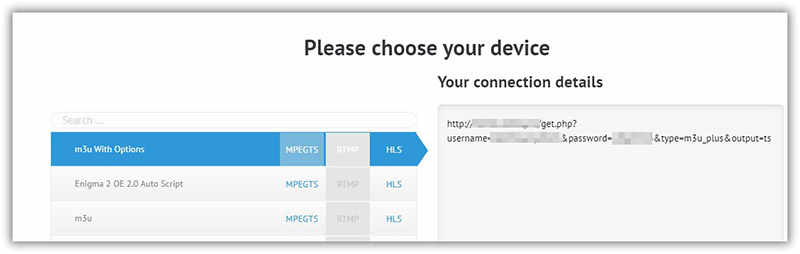
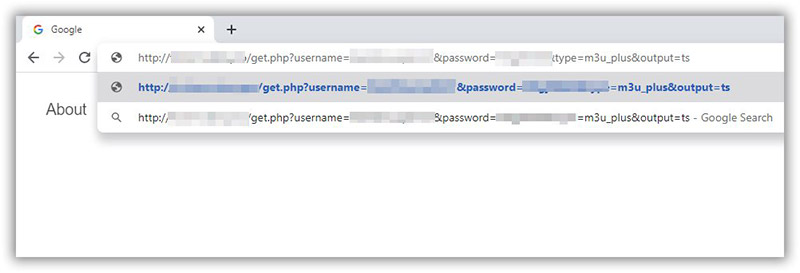
If you don’t have access to any dashboard system by your IPTV provider, you can test the M3U url in a browser to check it.
Copy/Paste the M3U url in a browser (in a PC or Smartphone), then press enter.
If the M3U file starts to download so it is correct, and if not you need to check M3U details with your IPTV provider.
⚠️ Additional M3U URL Troubleshooting Tips
🔍 1 – Check if the M3U URL Is Blocked
Make sure your IPTV provider hasn’t blocked your M3U line. Many providers restrict the number of devices that can be used simultaneously. If you exceed the allowed connections, the provider may temporarily block access.
✅ Tip: If your provider offers a dashboard, use the diagnostic tool to check the status of your M3U URL.
🔁 2 – Reload the M3U URL in Your App
Once you've confirmed that your M3U details are correct and active, try reloading the URL in your IPTV app.
In many cases, this simple step resolves the issue.
💻 3 – Test the M3U URL on Another Device or App
If reloading doesn’t help, test the M3U link on a different device or application to verify whether the issue is app-related.
✅ Recommended testing options:
VLC Media Player (PC) – A reliable way to test M3U links.
GSE Smart IPTV (Smartphone) – Great for mobile testing.
Other Smart TV apps – If you're facing issues with apps like Smart IPTV, try alternatives such as:
SS IPTV
If the M3U URL works fine in VLC or GSE but not on your TV, the issue likely lies with the specific app, not the IPTV line itself.
📞 4 – Contact IPTV Support
If you've verified everything and the issue still persists, reach out to your IPTV provider’s support team. They can check your M3U line status and help resolve the issue from their end.
💡 Additional Tips
Always use the live M3U URL, not a downloaded static file, to ensure you receive channel updates and changes in real-time.
Never share your M3U details (especially username, password, or full URL) in public forums or social platforms to avoid unauthorized access or security risks.