
AmbKonnect
Home
TV Channels
Guides
Resellers
Store
  1. Home
  2. /
  3. Help Centre
  4. /
  5. IPTV Applications
  6. /
  7. How to setup IPTV on GSE via Xtream-Codes API?
← Back to Help Centre
IPTV Applications · Android AppsUpdated 4 Jul 2026

How to setup IPTV on GSE via Xtream-Codes API?

How to Set Up IPTV on GSE SMART IPTV Using Xtream-Codes API

In this guide, we’ll walk you through the process of adding IPTV channels to your GSE SMART IPTV App using the Xtream-Codes API method.
GSE is a powerful, customizable IPTV solution that supports both live and on-demand streaming. It includes a built-in media player compatible with a wide range of formats, including M3U playlists. The app is available for both Android and iOS devices.

Looking for another method?
See: How to set up IPTV on GSE using a Remote Playlist


Why Use Xtream-Codes API in GSE?

Setting up IPTV via Xtream-Codes API offers several advantages:

  • Automatic EPG integration – No need to manually enter an EPG URL.

  • Auto-updated EPG – EPG information refreshes automatically.

  • Catch-Up Support – If your IPTV provider offers catch-up TV, it will be available using Xtream-Codes API—similar to the MAG portal experience.


Download GSE SMART IPTV App

You can install the app using the links below:

  • Android:
    Download for Android (APKPure)

  • iOS:
    Download on the App Store


How to Add IPTV Channels Using Xtream-Codes API

Step 1: Download and install the GSE SMART IPTV App from the link above.
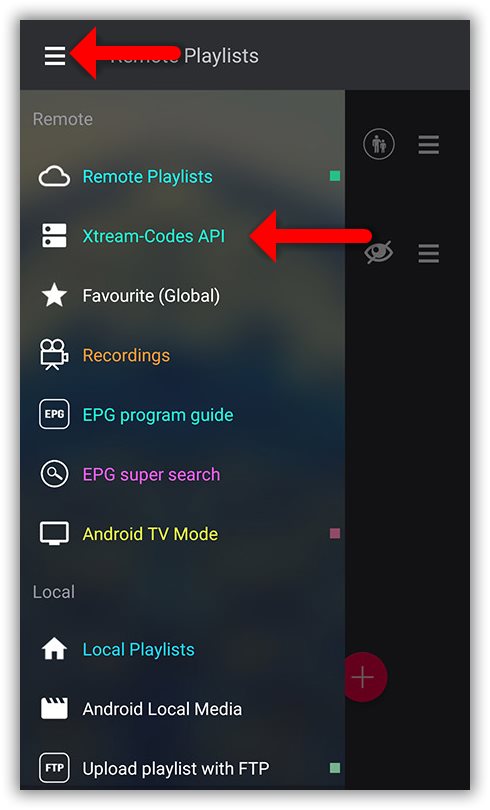
Once installed, open the app and tap the menu icon (three horizontal lines) in the top-left corner.
From the menu, select “Xtream-Codes API.”
How to setup IPTV on GSE via Xtream-Codes API? — illustration 1

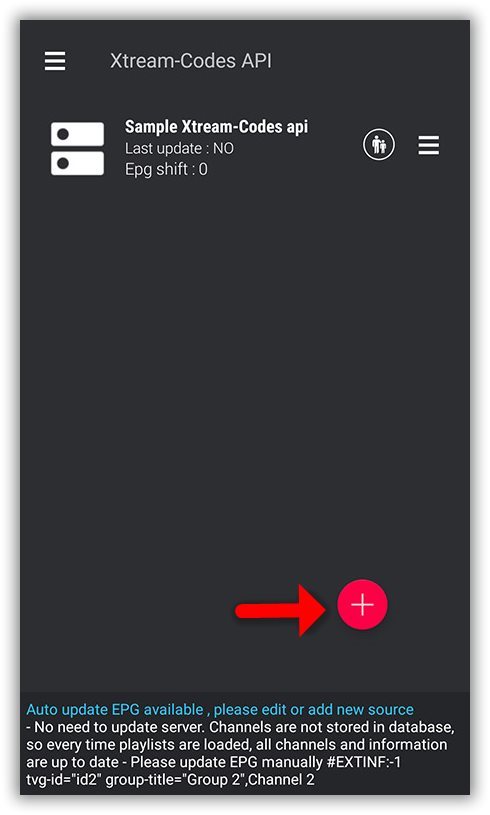
Step 2: On the down right corner click on the red circle.
How to setup IPTV on GSE via Xtream-Codes API? — illustration 2

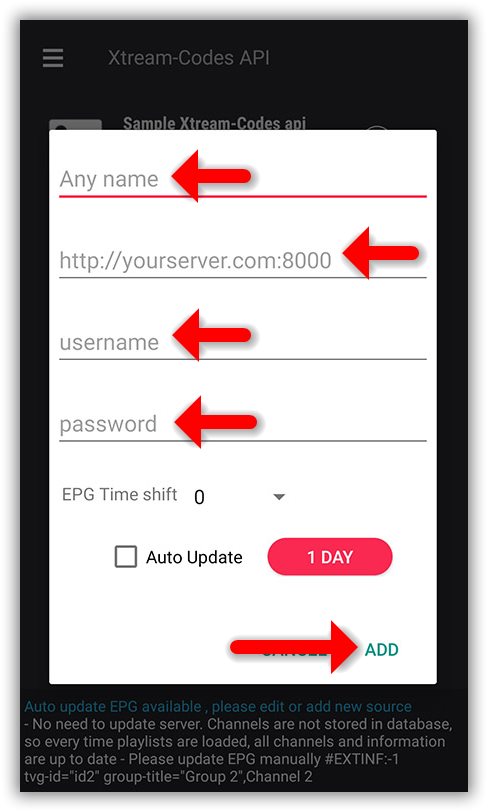
Step 3: Choose a name for your IPTV list—any name will work, such as “MY IPTV”.
Next, enter the Server URL, Username, and Password—these details are all included in the M3U URL provided by your IPTV service.

Once all the information is entered, click “Add” to complete the setup.
How to setup IPTV on GSE via Xtream-Codes API? — illustration 3

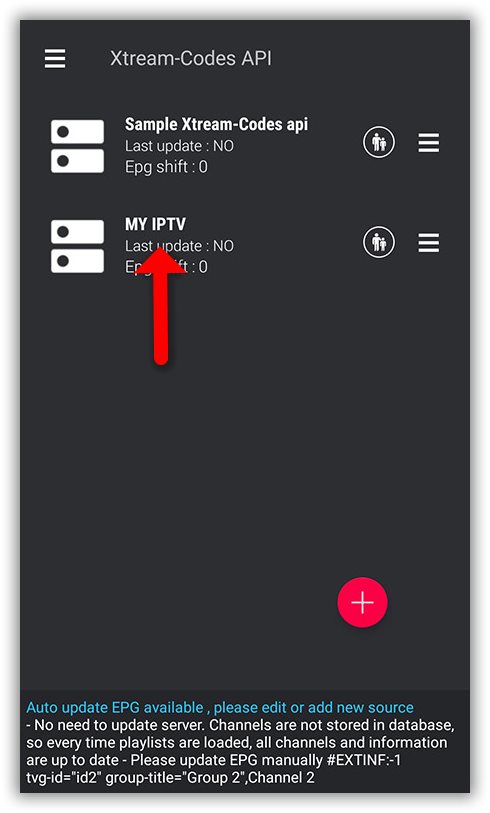
Step 4: Now you will find your “IPTV list” in the menu, click on it.
How to setup IPTV on GSE via Xtream-Codes API? — illustration 4

Step 5: Wait for the channels to be added to your application and this might take a little time depending on which countries or channels groups your M3U file contains.
You will see the LIVE channels and VOD list.
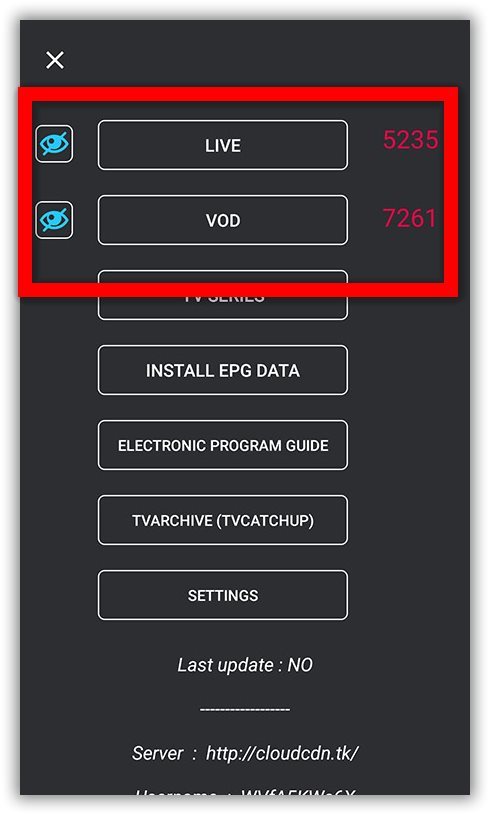
How to setup IPTV on GSE via Xtream-Codes API? — illustration 5

Step 6: By click on LINE you will see the channel groups. 
Select the channel that you want to watch and click on “Play”.

How to load EPG in GSE using Xtream-Codes API

Step 1: You can easily add EPG in GSE by clicking on “INSTALL EPG DATA”
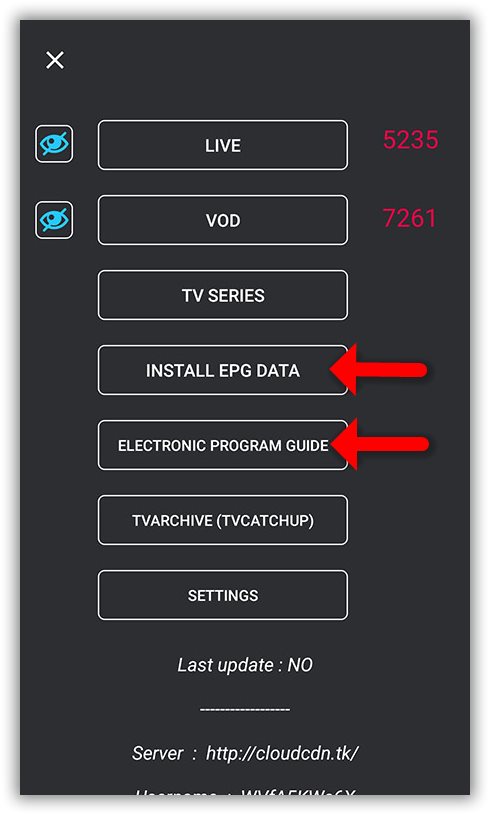
How to setup IPTV on GSE via Xtream-Codes API? — illustration 6

Step 2: Wait until the EPG data downloading after that you can see the EPG list by click on “ELECTRONIC PROGRAM GUIDE” .
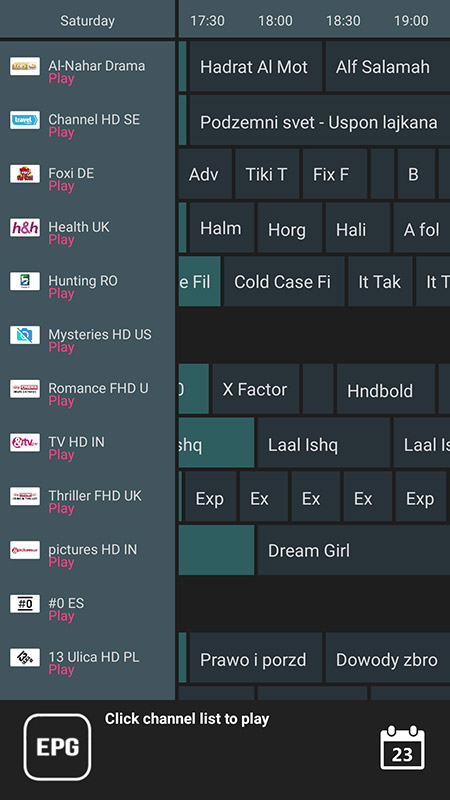
How to setup IPTV on GSE via Xtream-Codes API? — illustration 7

More in Android Apps

View all →
  • How to setup IPTV on IPTV Smarters Pro?
  • How to setup IPTV on TiviMate IPTV Player?
  • How to Download and Install an IPTV App (APK) on Android Mobile or Android TV Box

Related guides

IPTV Applications · Android Apps

How to setup IPTV on IPTV Smarters Pro?

IPTV Smarters Pro is one of the most user-friendly IPTV apps, offering your valued customers the ability to watch Live TV, VOD, Series, Catch-up, and Multi-Screen on their Android and iOS devices (including smartphones,

Read guide →
IPTV Applications · Android Apps

How to setup IPTV on TiviMate IPTV Player?

TiviMate IPTV Player Overview TiviMate IPTV Player is an Android-based application used to watch IPTV content. It supports both remote playlists and the Xtream Codes API system. It's a popular choice for streaming IPTV c

Read guide →
IPTV Applications · iOS Apps

How to setup IPTV on GSE via Remote Playlist?

How to Add IPTV Channels to GSE SMART IPTV App In this guide, we'll walk you through the process of adding IPTV channels to the GSE SMART IPTV App . GSE is a powerful, user-configurable IPTV solution that supports both l

Read guide →
IPTV Applications · Windows

How to setup IPTV on Kodi?

Installing and setting up Kodi is quick and straightforward. Simply download the app, run the installer, and follow the setup wizard. Once installed, you can enhance your experience by adding a variety of community-devel

Read guide →

Explore AmbKonnect

  • Quick setup guidesGet streaming in under 10 minutes
  • All help articles42 guides for every device
  • TV channel list15,000+ live channels worldwide
  • Pricing plansCompare subscription options
  • Subscribe nowInstant activation, money-back guarantee
  • Contact supportOpen a ticket — we reply 24/7
All articlesQuick setup guidesContact supportSubscribe now
AmbKonnect

Seamless Streaming, Unmatched Quality. Your Ultimate IPTV Experience. Since 2010.

Navigation

  • Home
  • TV Channels
  • Subscribe
  • Members Area

Help Center

  • Blog
  • Help Centre
  • Setup Guides
  • Contact Us

Legal

  • Terms
  • Privacy
  • Abuse report
© 2026 AmbKonnect. All rights reserved.