
AmbKonnect
Home
TV Channels
Guides
Resellers
Store
  1. Home
  2. /
  3. Help Centre
  4. /
  5. Boxes
  6. /
  7. How to setup IPTV on FormulerZ8 box via MYTV Online 2 app?
← Back to Help Centre
Boxes · Formuler BoxUpdated 5 Jul 2026

How to setup IPTV on FormulerZ8 box via MYTV Online 2 app?

FormulerZ boxes are among the top choices for IPTV streaming, thanks to their advanced features and flexibility. One of their key advantages is the ability to support both MAC-based portal systems and M3U-based playlists, offering users greater compatibility with different IPTV services.

The Formuler Z8 is the latest in the lineup, featuring the MYTVOnline 2 application and support for 4K Ultra HD streaming. This makes it a powerful option for high-quality IPTV viewing.


🎯 How to Set Up IPTV on MYTVOnline 2 (Formuler Z8 / Z10)

This step-by-step guide is compatible with all recent Formuler models, including the Formuler Z8+ and Formuler Z10.

Let’s get started with bringing IPTV channels to your MYTVOnline 2 app on these devices.
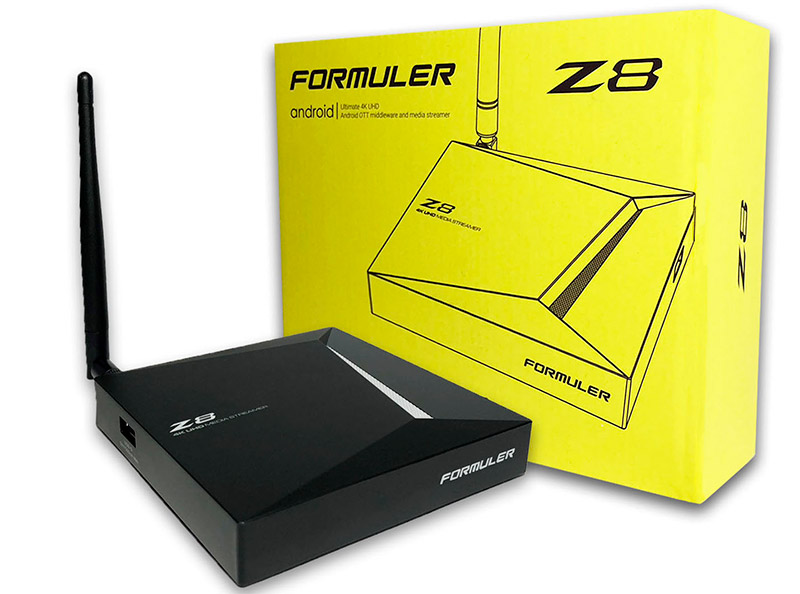
How to setup IPTV on FormulerZ8 box via MYTV Online 2 app? — illustration 1

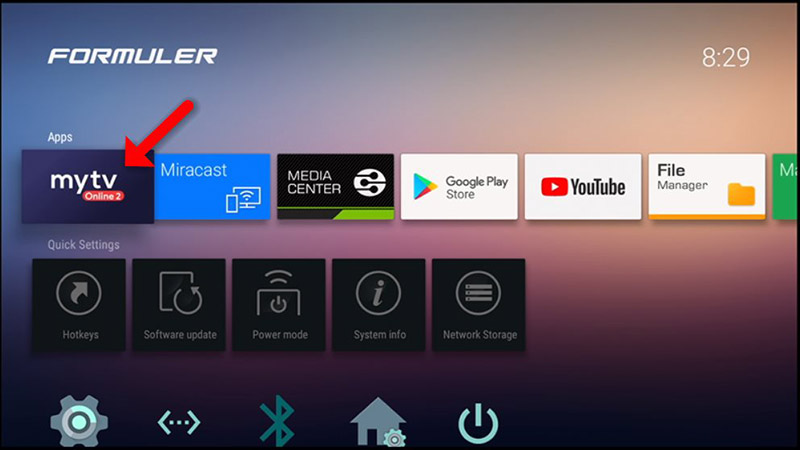
Step 1: Open the exclusive application for watching IPTV in Formuler boxes “MYTV Online 2”.
If you don’t have this application on your device you can download it from the Google Play store.

How to setup IPTV on FormulerZ8 box via MYTV Online 2 app? — illustration 2

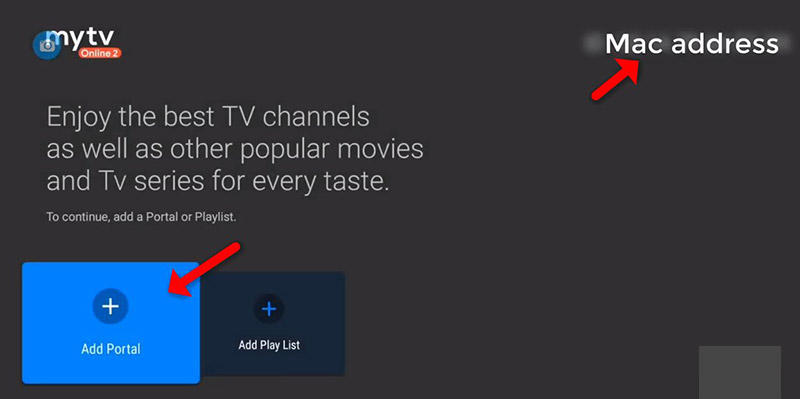
Step 2:  You can see the box’s MAC in the top right of this page.
Please note, this MAC address must be given to your IPTV provider (Some progressive IPTV provider present you a dashboard to manage IPTV settings, you can Add MAC address to your subscription in dashboard)

Here you can see the two options, select “Add Portal” to set device as a MAC base device like MAG boxes.
How to setup IPTV on FormulerZ8 box via MYTV Online 2 app? — illustration 3

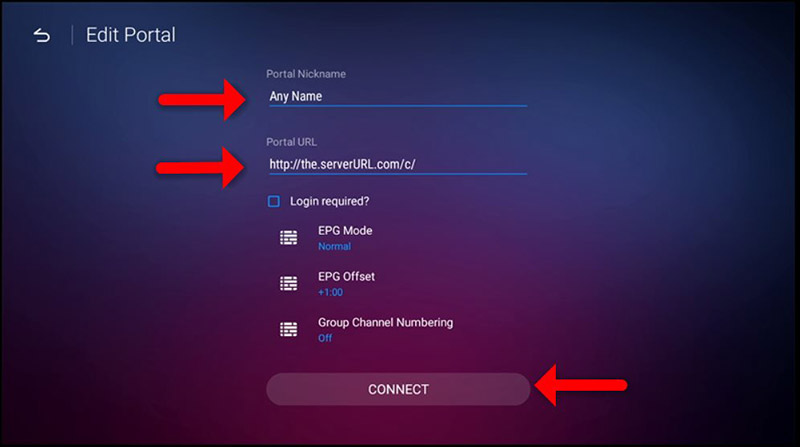
Step 3: Enter Portal Nickname (Example: MYIPTV).
Enter IPTV Portal URL you get from your IPTV provider and click on “CONNECT”. You can ask for portal URL from your IPTV service provider.
How to setup IPTV on FormulerZ8 box via MYTV Online 2 app? — illustration 4

Step 4: Successful Connection! You receive all channels associated with your subscription
Please note, this might take a little time…

How to setup FormulerZ8 with MYTV Online 2 using M3U Url

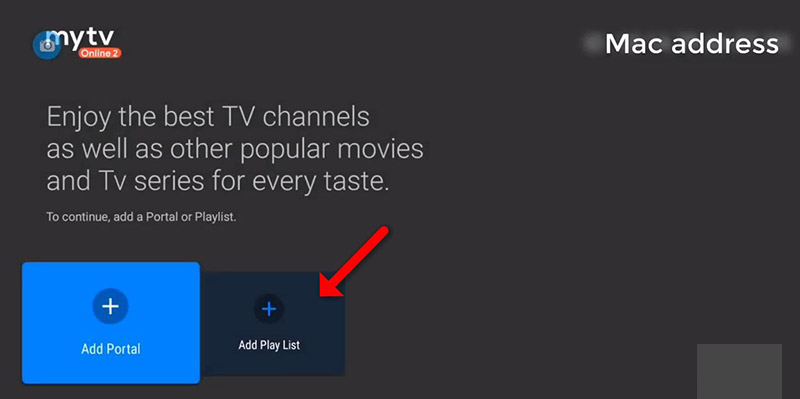
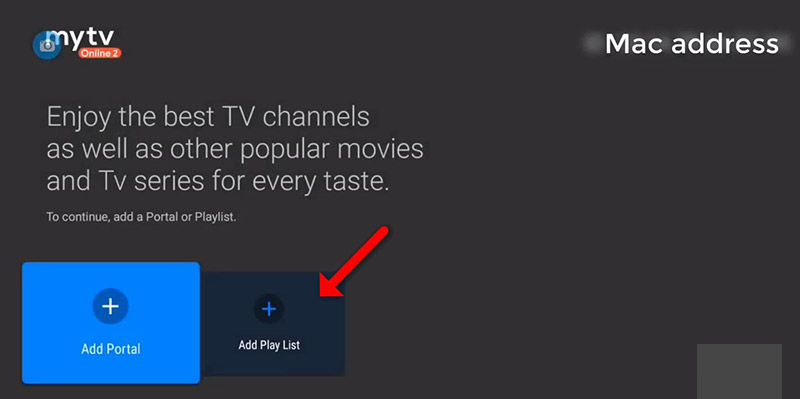
Step 1: After opening the MYTV online application you have two options.
To setup FormulerZ8 using M3U url you need to select “Add Playlist” here.
How to setup IPTV on FormulerZ8 box via MYTV Online 2 app? — illustration 5

Step 2: Enter Playlist Nickname (Example: MYIPTV).

Enter IPTV M3U URL you get from your IPTV provider and click on “CONNECT”. (Some progressive IPTV provider present you a dashboard to manage IPTV settings, you can Access your M3U Url in dashboard)
Note: If you add M3U with Options Url here, Do not need to Add VOD or EPG url anymore. For more information please contact your IPTV provider.

How to setup IPTV on FormulerZ8 box via MYTV Online 2 app? — illustration 6

Step 3: Now Everything is ready and you can start watching Live TV.
Please note, this might take a little time.

More in Formuler Box

View all →
  • How to setup IPTV on Formuler box via MYTV Online app?
  • How to setup IPTV on FormulerZ11 box via MYTV Online 3 app?

Related guides

Boxes · Formuler Box

How to setup IPTV on Formuler box via MYTV Online app?

In this guide, we’ll walk you through the steps to set up IPTV channels on MYTV Online using a Formuler Z device. Formuler Z is a modern hybrid device that combines an IPTV receiver with an Android media player . Since i

Read guide →
Boxes · Formuler Box

How to setup IPTV on FormulerZ11 box via MYTV Online 3 app?

Formuler Z boxes are among the most reliable and feature-rich devices for IPTV viewing. Their biggest advantage is support for both MAC-based portal systems and M3U playlist formats , giving users flexibility with variou

Read guide →
Boxes · Other boxes

How to Setup IPTV on Enigma 2 via Autoscript?

Enigma2 is an open-source operating system used in Linux-based satellite and IPTV receivers such as VU+ and Dreambox . It offers a wide range of advanced features, including: Auto-Bouquets (automated channel organization

Read guide →
Boxes · Other boxes

How to Setup IPTV on Enigma 2 via XtreamTV plugin?

In this tutorial, we'll guide you through the process of adding IPTV channels to your Enigma2 device using the XtreamTV plugin . Please note that a computer is required to complete this setup. 🔧 What You’ll Need: XtreamT

Read guide →

Explore AmbKonnect

  • Quick setup guidesGet streaming in under 10 minutes
  • All help articles42 guides for every device
  • TV channel list15,000+ live channels worldwide
  • Pricing plansCompare subscription options
  • Subscribe nowInstant activation, money-back guarantee
  • Contact supportOpen a ticket — we reply 24/7
All articlesQuick setup guidesContact supportSubscribe now
AmbKonnect

Seamless Streaming, Unmatched Quality. Your Ultimate IPTV Experience. Since 2010.

Navigation

  • Home
  • TV Channels
  • Subscribe
  • Members Area

Help Center

  • Blog
  • Help Centre
  • Setup Guides
  • Contact Us

Legal

  • Terms
  • Privacy
  • Abuse report
© 2026 AmbKonnect. All rights reserved.