
AmbKonnect
Home
TV Channels
Guides
Resellers
Store
  1. Home
  2. /
  3. Help Centre
  4. /
  5. IPTV Applications
  6. /
  7. How to Set Up Supa Legacy IPTV App on iOS (iPhone & iPad)
← Back to Help Centre
IPTV Applications · iOS AppsUpdated 4 Jul 2026

How to Set Up Supa Legacy IPTV App on iOS (iPhone & iPad)

Supa Legacy IPTV is a lightweight and user-friendly IPTV player for iOS devices. It is specifically designed for MAC-based IPTV services, making it a perfect choice for users who want a simple, stable, and reliable IPTV experience.

✅ Compatible with: iPhone, iPad & Macbook
🔗 Download Link: Supa Legacy IPTV on App Store


🔹 Step 1: Download Supa Legacy IPTV

  1. Open the App Store on your iPhone or iPad.

  2. Search for "Supa Legacy IPTV" or use this direct link:
    👉 https://apps.apple.com/us/app/supa-legacy-iptv/id1507777753

  3. Tap Get to install the app.

  4. Once installed, open the app.


🔹 Step 2: Locate Your Supa MAC Address

When you open the app for the first time, you’ll see a MAC address displayed on the screen.
It typically looks like this:
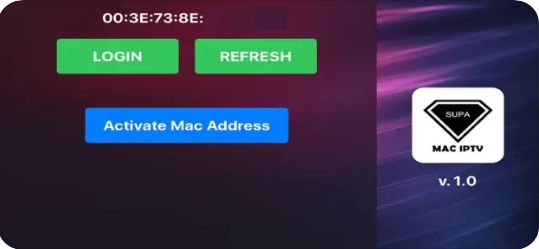
How to Set Up Supa Legacy IPTV App on iOS (iPhone & iPad) — illustration 1

23:A3:G4:B2:G1

This is your unique device ID used to activate your IPTV subscription.


🔹 Step 3: Send Your MAC Address to Your IPTV Provider

To activate your IPTV service, follow these steps:

  1. Copy or note down the MAC address shown in the Supa app.

  2. Contact your IPTV provider through their preferred method (email, live chat, or user panel).

  3. Send them a message like this:

    "Hi, please activate my IPTV subscription for Supa Legacy IPTV. My MAC address is: 23:A3:G4:B2:G1"

  4. Wait for confirmation that your MAC address has been linked to your IPTV account.


🔹 Step 4: Restart the App

Once your provider confirms activation:

  1. Close the Supa Legacy IPTV app completely.

  2. Reopen the app.

  3. Your channels should now load and display on the screen.


✅ You're Ready to Watch IPTV

You now have access to live channels, VOD (movies & series), and more—depending on your IPTV provider’s package.


💡 Useful Tips

  • Stable Internet: Ensure you have a good internet connection (Wi-Fi or 4G/5G) for smooth playback.

  • Missing Channels? Confirm with your provider that your MAC was entered correctly and your subscription is active.

  • No Activation Yet? If it still doesn't work, double-check that you sent the correct MAC format shown in the app.

More in iOS Apps

View all →
  • How to setup IPTV on IPTV Smarters Pro?
  • How to setup IPTV on GSE via Remote Playlist?
  • How to setup IPTV on GSE via Xtream-Codes API?

Related guides

IPTV Applications · Android Apps

How to setup IPTV on IPTV Smarters Pro?

IPTV Smarters Pro is one of the most user-friendly IPTV apps, offering your valued customers the ability to watch Live TV, VOD, Series, Catch-up, and Multi-Screen on their Android and iOS devices (including smartphones,

Read guide →
IPTV Applications · Android Apps

How to setup IPTV on GSE via Xtream-Codes API?

How to Set Up IPTV on GSE SMART IPTV Using Xtream-Codes API In this guide, we’ll walk you through the process of adding IPTV channels to your GSE SMART IPTV App using the Xtream-Codes API method. GSE is a powerful, custo

Read guide →
IPTV Applications · iOS Apps

How to setup IPTV on GSE via Remote Playlist?

How to Add IPTV Channels to GSE SMART IPTV App In this guide, we'll walk you through the process of adding IPTV channels to the GSE SMART IPTV App . GSE is a powerful, user-configurable IPTV solution that supports both l

Read guide →
IPTV Applications · Windows

How to setup IPTV on Kodi?

Installing and setting up Kodi is quick and straightforward. Simply download the app, run the installer, and follow the setup wizard. Once installed, you can enhance your experience by adding a variety of community-devel

Read guide →

Explore AmbKonnect

  • Quick setup guidesGet streaming in under 10 minutes
  • All help articles42 guides for every device
  • TV channel list15,000+ live channels worldwide
  • Pricing plansCompare subscription options
  • Subscribe nowInstant activation, money-back guarantee
  • Contact supportOpen a ticket — we reply 24/7
All articlesQuick setup guidesContact supportSubscribe now
AmbKonnect

Seamless Streaming, Unmatched Quality. Your Ultimate IPTV Experience. Since 2010.

Navigation

  • Home
  • TV Channels
  • Subscribe
  • Members Area

Help Center

  • Blog
  • Help Centre
  • Setup Guides
  • Contact Us

Legal

  • Terms
  • Privacy
  • Abuse report
© 2026 AmbKonnect. All rights reserved.